



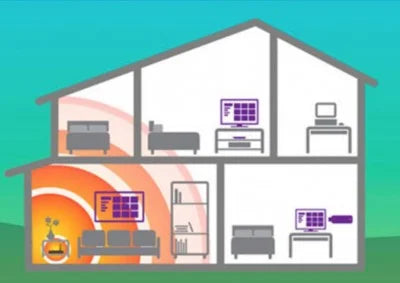

What happens with Wi-Fi when a house is large and has more than one floor or thick walls? How can these inconveniences be solved?
If your Wi-Fi network doesn't reach all the places you want, here are some ways to extend Wi-Fi coverage and get a more powerful wireless signal at home.
Here's a short guide to solving them, from least to most effective.
1- Check the router's position
2 - Find less saturated channels
3- Use 2.4GHz Wi-Fi instead of 5GHz
4- Wi-Fi signal repeaters
5- Wired installation
6- Plastic Optical Fiber
%20(1400%20%C3%97%20450%20px)(1)-min.png)
It's the big problem in many homes: poor Wi-Fi reception!
And the thing is, Wi-Fi has become the most requested service wherever we go; some people even need it before running water!
With the increasing use of connected devices, we need more and more bandwidth in more parts of the house, but of course,
what happens when a house is large, has more than one floor, or the walls are thick?
How can these inconveniences be solved?
Here's a short guide to solving them, from least to most effective.
1- Check that the router's position is optimal
Many installation technicians place routers as close as possible to the house's telephone connection or the main computer, but this is not always the best option to cover the maximum area of the house. A first measure to try is to place the router in a more central location in the house, both vertically, if there are several floors, and horizontally.
If, for example, we place it in a living room at one end of your house, the signal will have to pass through many walls and travel a long distance to reach the furthest rooms, whereas if you place it in the center of the house, the signal will be distributed more evenly.
It's also important to place the router in a relatively high position.
And finally, you have to consider how you surround the router. It won't do much good to place the router in the middle of the house if it's inside a cupboard or in a false ceiling. Walls also limit the signal.

2- Find less saturated channels
Did you know that Wi-Fi signals have a channel? With all the Wi-Fi devices surrounding our lives, communications can get quite crowded.
To ensure devices have as little conflict as possible, channels are used to separate devices from each other and to achieve a better signal connection. Of course, the more devices you have, the more channels will become saturated, and as a result, your Wi-Fi quality will suffer.
As such, it's a good idea to check your Wi-Fi channels to see what's happening.
If you want to change the Wi-Fi channel, you can do it through the router, but each model does it differently, so you'll have to read the manual to find out how to change it, it's not very complicated. It will involve logging in through the browser and changing the settings.
There are free applications like Wifi Analyzer, which analyze the status of the channels around you and will tell you which channel you are on and which is currently recommended.

3- Use 2.4GHz Wi-Fi instead of 5GHz
Wi-Fi can use one of two frequency bands: 2.4 GHz or 5 GHz. Many people think the latter is better because it offers faster speeds.
However, this comes at a price: range. The higher the frequency, the shorter the wavelength. And 5GHz signals cannot penetrate walls, ceilings, desks, and, yes, people as well as 2.4GHz signals. (By the way, this is why 5G promises such fast speeds, because it uses much higher frequencies - called millimeter waves - but these signals struggle to pass through glass, trees, and even rain.)
Here's how to find out what my Wi-Fi is.
On the other hand, the 2.4 GHz frequency is better for sending a signal over a longer distance, at slower speeds. Therefore, you might get better range from your router if you force your phone or laptop to connect to your router's 2.4 GHz network. Many routers combine the two frequencies into a single network name. This is done for convenience, but it means you can't choose which network to connect to.
If your router is like this, go to the configuration webpage and look for a Wi-Fi menu where you can split the two frequencies into two distinct network names.
It should be noted that 2.4 GHz devices face a battle because many other things also use this frequency, such as microwaves, baby monitors, Bluetooth, and others.
These can cause interference, which reduces Wi-Fi signal speed and range. The greater the range, the lower the speed; the greater the speed, the more interference will need to be mitigated and the closer you will need to work to an access point.
Therefore, mileage may vary, but it's worth understanding the difference between Wi-Fi bands, as you can use them to your advantage.

4 - Wi-Fi signal repeaters

It's possible that if you've already tried the previous options, you might have opted for Wi-Fi or PLC repeaters.
Signal repeaters work when bandwidth demands are not very high or when spaces and wall thicknesses are small.
Wi-Fi repeaters and PLCs are two very different types of technology designed to achieve the same goal: providing an internet connection over a longer distance.
A Wi-Fi repeater is essentially like a small hub that can be physically placed between the router and the PC to take the Wi-Fi signal from the router and extend it over a longer distance.
A PLC adapter consists of two plugs connected to the home's electrical network. Powerline adapters can connect wirelessly or by cable to the router and send the signal through the house's electrical wiring, which in some cases allows you to eliminate wall restrictions.
The problem with these two options is that neither of them transmits 100% of the signal contracted with the operator, and with both, you can experience different types of interference issues.
With signal repeaters and PLC options, you can get between 20% and 40% of the signal; depending on your needs/requirements, these options may be insufficient.
Finally, you have the Wi-Fi mesh option, which consists of connecting several repeaters to each other, but this variation is still an option that does not offer 100% and costs significantly more.
5- Wired installation
Ultimately, the most reliable and highest-performing solution is always to use cables. In fact, this is how the internet is transmitted worldwide, even across oceans: with long intercontinental cables. Today, this remains the most reliable method and applies to our homes on a smaller scale, also looking towards the future.
In some cases, Ethernet cable at 1 GBPS speed has been used to wire the house, but Ethernet wiring is not always a feasible solution if the installation lacks the appropriate conduits, which is usually the most common situation. That's why almost no one has it, as the alternative involves a costly installation. It would require creating new conduits or hiding the cable, which is quite thick.
6- The best quality/price solution: plastic optical fiber
And we arrive at what we believe is undoubtedly the best solution available on the market: Plastic Optical Fiber. Plastic optical fiber or POF has been used in automotive and aeronautical electronics and is a flexible and very resistant material that can be routed through electrical/TV/telephone conduits, making installation simple and quick.
Plastic Optical Fiber (POF) guarantees up to 1 Gbps and is an economical solution that can offer high speed of 1Gbps at 50m distance, immune to interference and with easy installation due to the plastic material that can be installed together with electrical cables sharing the same conduits.

This way, we can bring an internet outlet to each room as if the router were right there. In fact, Movistar specialists have proven that by installing just 1 access point with Plastic Optical Fiber in a room, the Wi-Fi signal in the house was covered much more effectively than with the other methods mentioned above.
If you are interested in learning more about Plastic Optical Fiber, consult our installation guide or Actelser products.
Or consult the plastic optical fiber kits


